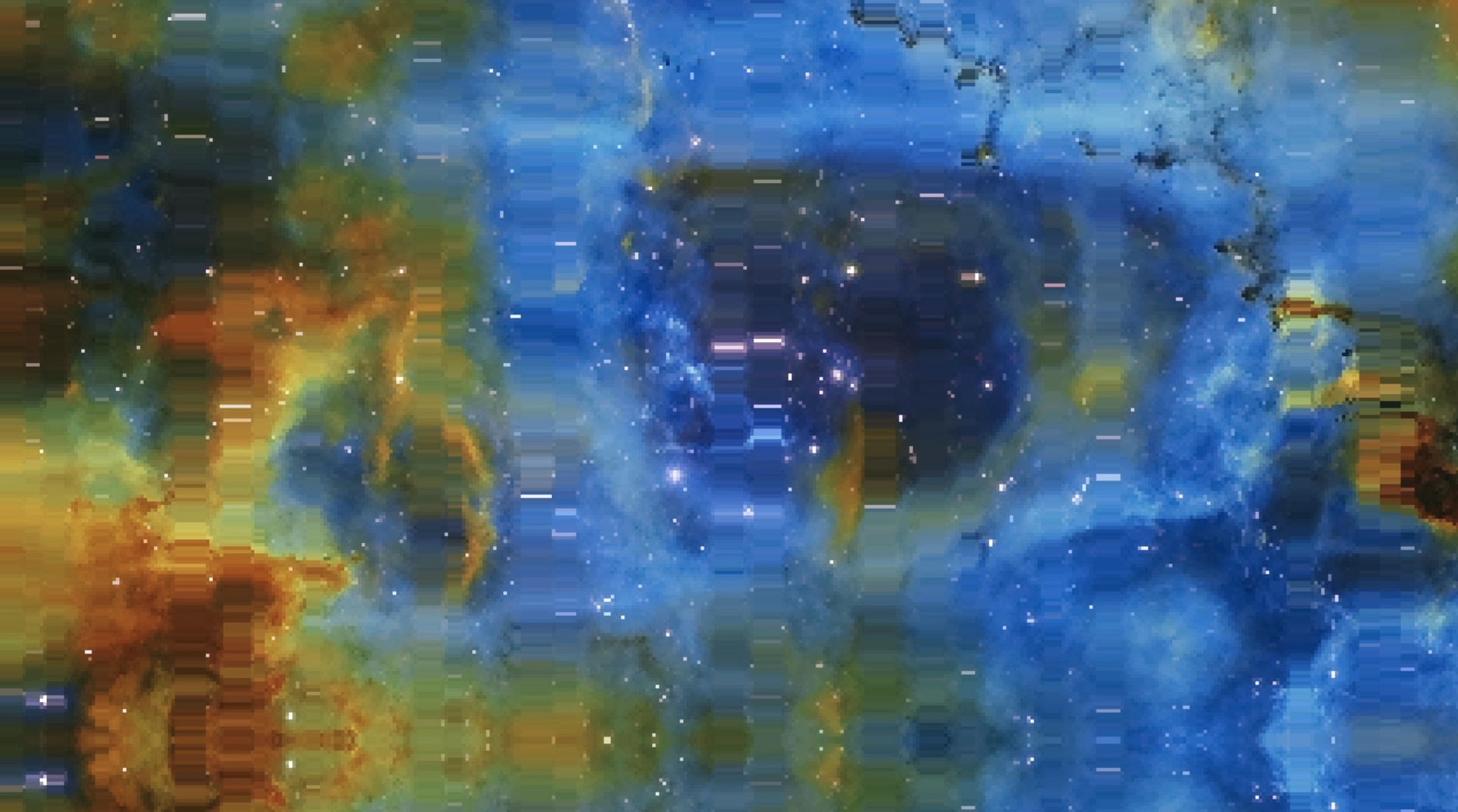
Image Trip is a visual mode for the Critter & Guitari EYESY video synthesizer that transforms static images into flowing, kaleidoscopic animations. The effect stretches and repeats rows and columns of pixels, creating organic distortions that feel like looking through a funhouse mirror.
The Concept
The idea was simple: take an image, randomly repeat certain rows and columns to create a “stretch” effect, and animate it with slow rotation and panning. The result would be something between a glitch effect and a lava lamp - structured enough to be recognizable, but warped enough to be hypnotic.
The five EYESY knobs would control:
- Vertical stretch amount
- Horizontal stretch amount
- How chaotic/dense the glitching is
- Which image to display
- A quality/performance tradeoff
First Attempt: NumPy
My initial implementation used NumPy for the pixel manipulation. NumPy is the natural choice for this kind of work - it’s fast, expressive, and makes array operations trivial. The row/column repeat logic was elegant:
import numpy as np

def apply_row_pattern(pixels, pattern):
    return pixels[pattern, :, :]

def apply_col_pattern(pixels, pattern):
    return pixels[:, pattern, :]
The pattern arrays contained indices that mapped output rows/columns to source rows/columns. Repeating a row was as simple as putting its index in the array multiple times.
This worked beautifully in the simulator. Smooth animations, clean code, easy to understand.
Then I loaded it onto the actual EYESY hardware.
ModuleNotFoundError: No module named 'numpy'The EYESY runs a minimal Linux installation on a Raspberry Pi. NumPy isn’t included, and there’s no easy way to install packages on the device, and I wanted the mode to be easily accessible to others. The mode needed to work with Python’s standard library only.
Second Attempt: PIL
No problem, I thought. PIL (Pillow) can handle image manipulation. I rewrote the effect using PIL’s image operations:
from PIL import Image

def apply_row_pattern(img, pattern):
    result = Image.new('RGB', img.size)
    for out_y, src_y in enumerate(pattern):
        row = img.crop((0, src_y, img.width, src_y + 1))
        result.paste(row, (0, out_y))
    return result
This was slower than NumPy but still manageable in the simulator. I added some optimizations using PIL’s ImageChops for blending effects and felt good about the solution.
Loaded it onto the EYESY:
ModuleNotFoundError: No module named 'PIL'PIL isn’t available either. The EYESY’s Python environment is truly bare-bones: just pygame and the standard library.
Third Attempt: Pure Pygame
This was the constraint I had to work within. No NumPy. No PIL. Just pygame.
Pygame isn’t really designed for pixel-level manipulation. It’s a game library - it wants you to blit sprites and draw shapes, not process images like a shader. But it does have the tools, if you’re willing to get creative.
The key insight was using surface.blit() with a source rectangle. Instead of copying individual pixels, I could copy strips:
def apply_row_pattern(surface, pattern, render_height):
    result = pygame.Surface((surface.get_width(), render_height))
    for out_y, src_y in enumerate(pattern):
        # Copy one row from source to destination
        result.blit(surface, (0, out_y), (0, src_y, surface.get_width(), 1))
    return result
For the seamless rotation effect, I created a 3x3 mirrored tessellation of the source image. By mirroring adjacent tiles, the edges always match up, so rotation never reveals seams:
def build_tiled_image(surface):
    w, h = surface.get_size()
    tiled = pygame.Surface((w * 3, h * 3))

    flipped_h = pygame.transform.flip(surface, True, False)
    flipped_v = pygame.transform.flip(surface, False, True)
    flipped_both = pygame.transform.flip(surface, True, True)

    # Arrange in 3x3 grid with alternating flips
    # [flipped_both] [flipped_v] [flipped_both]
    # [flipped_h   ] [original ] [flipped_h   ]
    # [flipped_both] [flipped_v] [flipped_both]
    ...
This pure pygame version worked on the EYESY. But at 1280x720, it ran at less than 1 FPS. The Raspberry Pi just couldn’t keep up with all those blit operations at full resolution.
The Performance Solution: Dynamic Resolution
The fix was obvious in retrospect: render at a lower resolution and upscale. Instead of processing 921,600 pixels, process fewer and let the scaling hide the difference.
I mapped Knob 5 to control the downsampling factor:
downsample = 1 + int(etc.knob5 * 15)  # 1 to 16
render_width = 1280 // downsample
render_height = 720 // downsample
At Knob 5 = 0, you get full 1280x720 resolution (beautiful but slow). At Knob 5 = 1, you get 80x45 resolution upscaled (chunky pixels but fast).
The upscaling needed to use nearest-neighbor interpolation to keep the pixels sharp and blocky. Bilinear or Lanczos smoothing looked muddy and actually hurt performance.
This turned a limitation into a feature. The chunky pixel mode has its own aesthetic appeal - it looks like a lo-fi video effect from the 80s. Users can dial in exactly the quality/performance tradeoff they want.
The biggest compromise I had to accept was not having the shaders from NumPy. That version applied a guassian blur and added noise to make the resulting shifts feel more organic than the final result. you can see a preview of that version here (but video compression hates noise so it looks pretty bad):
https://www.youtube.com/watch?v=z-U5_KQ-91g
If you’d like to try it yourself, download the NumPy version here
Lessons Learned
Know your target platform. I made assumptions about available libraries that cost hours of rewriting. The EYESY’s constraints should have been my starting point, not a surprise at the end.
Constraints breed creativity. The pure pygame version forced me to think differently about the problem. The dynamic resolution control ended up being a better feature than any “optimization” would have been.
Test on hardware early. The simulator is convenient, but it’s not the truth. Real hardware has real limitations that only reveal themselves when you’re running on the actual device.
Simple is robust. The final version uses only pygame’s built-in transforms: flip, rotate, scale, blit. No dependencies, no edge cases, no surprises. It’ll keep working as long as pygame exists.
The Final Result
Image Trip transforms any image into a slowly morphing, breathing visual. The row and column stretching creates an effect somewhere between a reflection in rippling water and a frame from a Stan Brakhage film.
Load in photos, abstract patterns, or solid colors - they all become something new. The five knobs give enough control to find sweet spots between subtle and chaotic. And thanks to the resolution control, it runs smoothly on the EYESY hardware that it was built for.
Sometimes the best features come from working around limitations rather than fighting them.
Download the patch yourself here.