The SignalFunctionSet plugin currently ships eleven VCV Rack modules, with hardware ports for the 4ms MetaModule and the Expert Sleepers Disting NT. None of this would have happened on this timeline without an AI collaborator. I have always been a fairly technical person, but never got past some fairly basic database and script-level coding. Working with Claude Code has radically transformed what I am able to do and the pace at which I can ship working projects. In this post I’ll cover basics of how I work and what I’ve learned along the way. The TLDR is that at almost every stage I started by doing things manually only to discover that working with Claude was more efficient and usually delivered better results.
AI remains a controversial subject for a lot of people, especially in the creative realm. I don’t presume to believe that there is a single correct way of working with AI tools, but before I dive in, I’ll share my own half-formed thinking. Most of my projects are in support of creative endeavors, but I don’t have interest in AI solving the creative challenges. I view Claude Code as part of the toolchain, but I avoid tasking it with solving creative challenges on the user’s behalf. I’m not sure I see the point in “solving” creative challenges this way.
The setup
My setup is pretty simple: MacBook Air, Claude Code, the SignalFunctionSet repo on disk. After a tedious few weeks of manually building, I asked Claude to create a build.sh dev script that compiles and installs into VCV Rack so I can hear a new module within seconds of finishing a line of code. The local version is technically a separate plugin (appended with -dev) which allows me to run both the published and dev version of modules at the same time. Every module has a markdown manual in docs/ that the AI can read and update. The website you’re reading is the user-facing version of those manuals. For better or worse, the docs are all written by Claude after the module specs have been completed.
Claude sees the whole repo at once. When I’m working on a new feature for Phase, it can read phase.cpp end to end, understand the existing state machine for VCA fade-outs, and propose new code that fits the same conventions. Conversations carry context across days. If I ask “remember how we structured the recording finalization?” the answer comes back without me re-explaining.
Some people have strong opinions about managing context in Claude, but I have basically worked with the same thread in the Mac app since the beginning and haven’t had any challenges.
Design before code
I don’t write code or design panels before starting a new module. My initial approach with Drift was to start with a fully rendered panel, designed by hand. I like design, but when the concept is evolving, manually catching up is a waste of time. My current approach is to just work with Claude from the get go. I usually have a very clear vision of what I want to build, and the first step is explaining it clearly.
In the case of the Sequencer System modules, I worked out the way I wanted them to interact over a few weeks in my mind before starting to work on them. I brought the full set of ideas to the conversation at once and we refined each module (Meter → Beat → Note) one at a time. In each case the design conversation happened without a final set of jacks, knobs or screen elements.
I went back and forth with Claude on what each module should do and when we were ready to build, it took a stab at the layout. The initial layouts have been typically bad, but they get a working module up quickly, which matters more. Having the module in hand helps me realize where I might have been inarticulate or when my ideas simply weren’t fun to play. None of my modules have been “one shots”. It usually takes a number of revisions to get things feeling right, but in most cases I have a working module at the end of the first session.
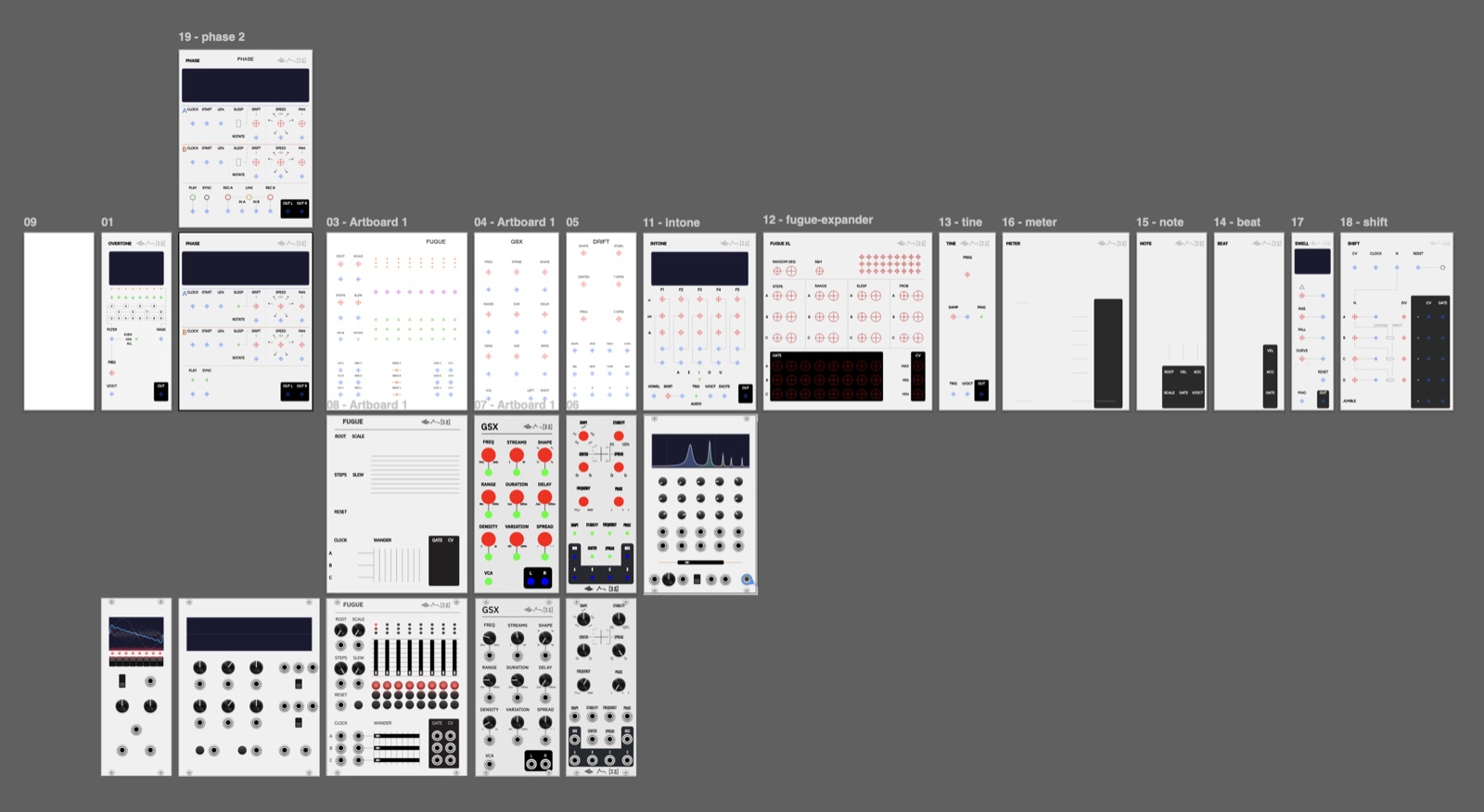
Once I’m happy with the module’s behavior, it is time to refine the design. For this, I work in either Illustrator or Figma. Rather than start from scratch, I ask Claude to update the panel SVG with precise reticles or shapes for each UI element. VCV Rack layers these in based upon coordinates specified in the file. Claude can make these as big as you want, and I typically ask for them to be as close to the real UI element size as possible in order to more effectively space out the panel text/design.
VCV Rack modules are specified in mm to make the translation from/to real Eurorack simple, but this is kind of a pain because it requires you to work in HP-scaled grids. I have built a fairly basic template in Illustrator to handle this and it works fine. I might build a panel designer at some point to replace this.
Once I have updated the design, I share an updated panel SVG and ask it to update the element coordinates. As long as it knows what each reticle represents, it does a splendid job. I attempted this manually with Drift and it was a nightmare.
Where Claude is unambiguously good
When the design is settled, Claude is good at implementing it within the conventions of the existing codebase. Adding a new parameter to a VCV Rack module requires touching the enum, the constructor’s configParam() call, the process() function, the JSON persistence in dataToJson() and dataFromJson(), the widget panel layout, and sometimes the context menu and the right-click defaults. Done by hand, that’s twenty minutes of careful typing. Done with Claude, the AI threads all of those edits at once and follows the existing style.
It’s similarly good at state machines that need to be correct on the first try. The Phase recording state machine moves between IDLE, ARMING, ACTIVE, and FINISHING states, with a 1 ms anti-click envelope at the boundaries and a deferred-finalization handoff from the audio thread to the GUI thread. The first implementation worked, and the bugs that turned up later were spec gaps, not state-machine errors.
Where Claude struggles
Physical panel layout is harder than it sounds. Getting the record buttons positioned right on the Phase panel took five iterations and several screenshots, because phrases like “above the IN jack” and “centered between the two groups” mean different things to the AI than they do to me. Manual panel fix-up is where I spend the most time. This is OK because I enjoy the work.
Claude can get confused. More than once, it has forgotten which module we’re working on and brought features from an unrelated module to the current one. On one occasion this was interesting; in every other case it was annoying.
AI is not a debugger. When a user reported that Phase crashed while pressing the record button with a low gate signal, Claude was good at hypothesizing: it walked the state machine, identified a plausible race in the deferred finalization step, proposed defensive guards. The real root cause needed log files and reproduction. The AI is excellent at narrowing the search space; it is not a replacement for actually understanding what your code does.
Also, for some reason Claude loves to invent new VCV Rack tags, which will cause a rejection on submission. Double check.
The audio thread
Real-time audio in VCV Rack is forgiving, but Claude won’t navigate the actual gotchas by default. The strict rules you’d flag in a JUCE plugin (atomics for any shared state, no allocations ever) don’t really apply: VCV’s threading model lets plain float fields cross the audio/GUI boundary safely on every modern CPU, and an occasional allocation outside the inner loop is fine.
The pitfalls Claude does miss without prompting are CPU-shaped, not memory-shaped. Rebuilding a lookup table on every knob change runs at audio rate if you’re not careful, which is 48,000× per second. Anti-click envelopes around every discontinuity (loop wraps, hard syncs, sample-jump triggers) need 1 ms fades or you get pops. State that the GUI iterates over while the audio thread mutates needs proper handoff, even if individual field reads don’t.
Once you flag the actual constraints, the AI works inside them. The fix is naming the real risks, not parroting the canonical real-time-audio rules.
Porting becomes a different kind of work
Once a module exists for VCV Rack, the work of porting it to another platform stops being primary engineering and becomes a translation task. The 4ms MetaModule port of most of the SignalFunctionSet modules happened in a matter of days. Most of the work was optimizing the code to work within the targeted CPU usage for MetaModule plugins.
The Disting NT port of Fugue, into a brand-new module called fugueNT that also folds in the per-voice extras from the Fugue X expander, took a couple of sessions. The AI read the Disting NT SDK, identified the API mappings, and produced a port that compiled and ran.
The bottleneck moves. It is no longer “how do I implement this on platform X.” It is “is the underlying design good enough that I want to put it in three places.” That is a much better question to be sitting with. But now, Fugue is live on all three places (with VST and AUv3 ports next on the list), and that is pretty cool.
The documentation flywheel
Cheap documentation changes what you ship. Every module now has a panel SVG, a C++ source file, an in-repo manual, a public website page, MetaModule metadata, and for some, a Disting NT port. That used to be unreasonable for a solo developer; with Claude it is the baseline. The website you are reading is essentially the user manual, and it stays in sync with the code because keeping it in sync is no longer expensive.
Closing
Building tools alone used to mean choosing scope ruthlessly. Now scope can be wider, but the editorial work, taste, restraint, knowing what is actually worth shipping, has gone up in proportion. The hard question is no longer “can I implement this?” It is “should this exist?” That is a better question to be sitting with, and it is the question the AI cannot answer for me.
If you’re interested in learning more, hit me up on the Discord, happy to share more about what is working and learn what might be working for other builders.