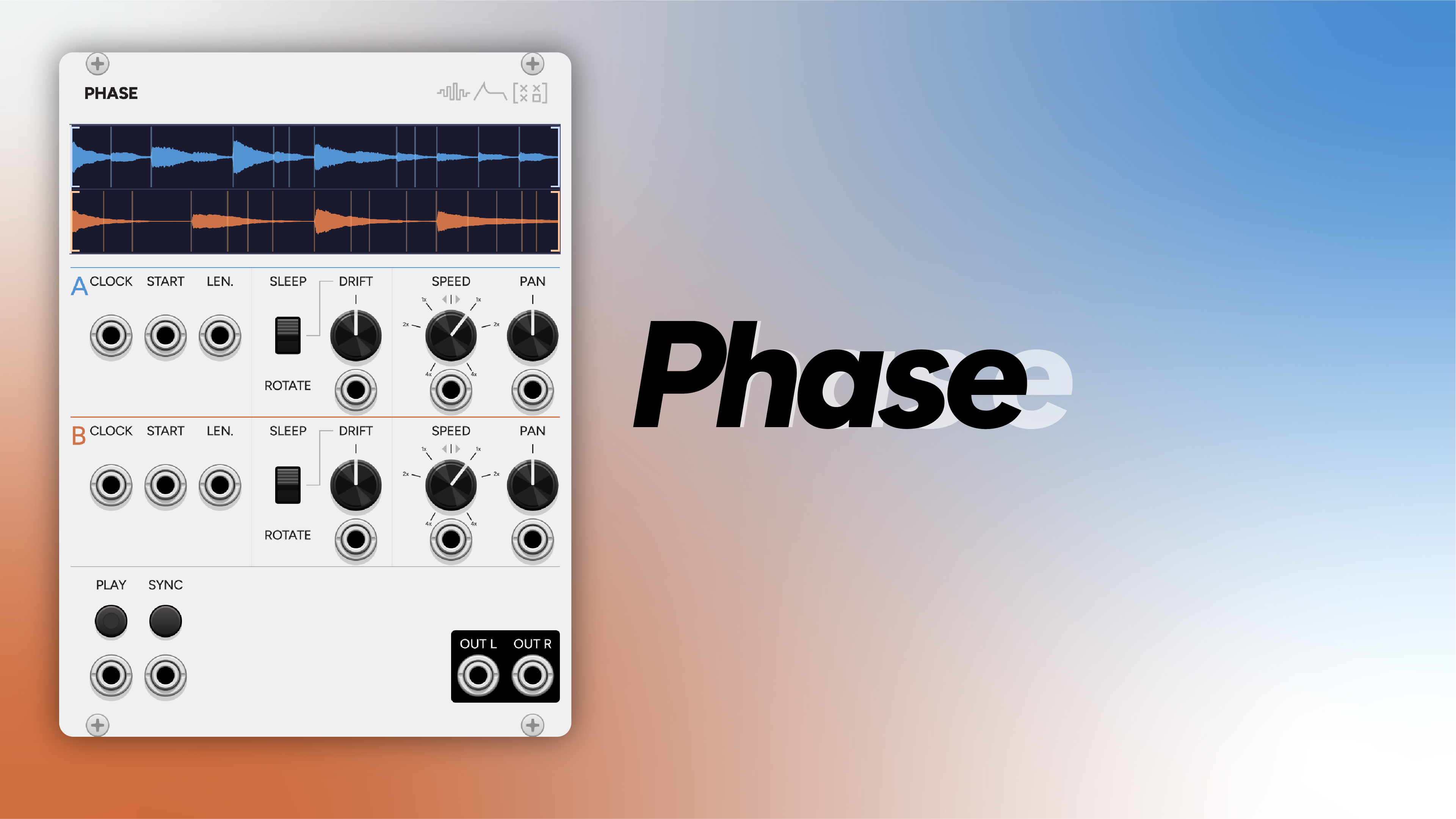
Dual sample looper with phase drift, inspired by Steve Reich’s tape phase compositions.
Phase plays two audio samples simultaneously and lets each loop drift relative to the other through one of two mechanisms: Sleep (silence gaps) or Rotate (continuous content drift, like tape machines at slightly different speeds). The result is the gradually shifting interplay made famous by works like It’s Gonna Rain and Piano Phase: identical material that slowly slides out of alignment, generates new patterns at the moments of overlap, and eventually returns to unison.
20 HP. Stereo output.
How phase drift works
Each loop has a Drift knob (-500ms to +500ms) and a Mode switch (Sleep or Rotate). The two modes create drift in different ways:
Sleep mode
After a loop completes one cycle, it waits the drift duration before restarting. If Loop A has 10ms of drift and Loop B has 0ms, Loop A’s effective period becomes sample_length + 10ms while Loop B’s stays at sample_length. They gradually shift apart and eventually realign: for a 5-second sample with 10ms difference, full realignment occurs after about 500 cycles (~42 minutes).
Negative drift in Sleep mode cuts the loop short instead: it ends |drift| ms early and immediately restarts. This drifts in the opposite direction.
Rotate mode
The loop plays continuously with no gaps. Drift becomes a tiny speed offset that causes content to gradually rotate within the loop region: like two tape machines running at slightly different speeds. The read position drifts by drift_ms worth of samples per loop cycle, calculated as (drift_ms × 48) / region_length extra speed per sample.
This creates a subtle pitch shift proportional to the drift rate. At 10ms drift over a 5-second loop, the pitch shifts by ~0.2% (~3.5 cents): inaudible. Even at extreme settings the shift stays musically subtle.
Negative drift rotates in the opposite direction. Both modes can be combined per-voice (one loop in Sleep, the other in Rotate) for hybrid behavior.
Controls
Per Loop (A and B)
| Control | Range | Default | Description |
|---|---|---|---|
| Drift | -500 to +500 ms | 0 ms | Phase drift amount and direction. In Sleep mode: positive = silence gap, negative = early restart. In Rotate mode: positive = drift forward, negative = drift backward. |
| Speed | -4× to +4× | 1× | Playback speed and direction. Center detent at 0 (stopped). Negative values play in reverse. |
| Pan | -1 to +1 | 0 (center) | Stereo position with equal-power panning. |
| Mode | Sleep / Rotate | Sleep | Selects how drift is applied to the loop. |
Global
- Play: green LED latch button toggles play/stop. Module outputs silence when stopped.
- Sync: momentary push button resets both loops to their start positions.
Inputs
Per Loop (A and B)
| Input | Function |
|---|---|
| CLK | Trigger: jump playhead to next detected transient within the loop region. Wraps to first transient at end. |
| START | 0–10V = 0–100% of sample. Sets loop start position. Overrides handle when patched. |
| LEN | 0–10V = 0–100% of remaining sample after start. Sets loop length. |
| Drift CV | ±5V, scale 50 ms/V (bipolar). |
| Speed CV | ±5V, scale 0.8×/V (bipolar). |
| Pan CV | ±5V, scale 0.2/V (bipolar). |
Global
| Input | Function |
|---|---|
| PLAY GATE | Gate input. High (>=1V) = play, overrides button state when patched. |
| SYNC | Trigger input. Resets both loops to their start positions, alongside the Sync button. |
Outputs
| Output | Function |
|---|---|
| L | Stereo left mix of both loops |
| R | Stereo right mix of both loops |
Output level is ±5V scaled per loop, mixed and clamped to ±10V at the output stage.
Sample loading
Right-click the module to access sample loading:
- Load Sample A / Load Sample B: opens a file dialog. WAV files are supported in mono or stereo, at any sample rate. Files are mixed down to mono on load (stereo positioning comes from the per-loop Pan control) and resampled to 48 kHz.
- Cascade behavior: if you load only Sample A, it’s automatically also loaded into Sample B. Loading Sample B explicitly breaks this cascade. This makes the classic Reich workflow (same sample in both loops) the default with no extra clicks.
- Clear Sample A / Clear Sample B: removes the loaded sample.
- Maximum sample length: 10 minutes (28.8M samples at 48 kHz).
- Persistence: file paths are saved with the patch and reloaded on patch open.
The waveform display
The display occupies the top of the module and shows both samples stacked:
- Top half: Sample A waveform in blue
- Bottom half: Sample B waveform in orange
- White vertical line: playhead position for each loop
- Subtle vertical lines: detected transient markers
- Bracket handles: draggable loop start/end markers
- Dimmed regions: areas outside the active loop region
- Origin line: semi-transparent vertical line showing where the original sample start has drifted to in Rotate mode
- Rotated waveform: in Rotate mode, the waveform image itself rotates to match the audio content as it drifts
Loop region handles
The bracket handles let you set the loop start and end points by dragging. Drag sensitivity accounts for VCV Rack’s zoom level, so dragging feels consistent regardless of zoom. Loop regions persist with the patch.
When the START or LEN CV inputs are patched, they override the handle positions.
Transient detection
Phase performs energy-based onset detection on each sample as it loads. Detected transients become jump targets for the CLK inputs and visual markers on the waveform display.
Algorithm
- RMS energy is computed in 1024-sample windows with 256-sample hop
- High-frequency energy is added via sample differencing: this catches sharp transients buried in noise
- A half-wave rectified onset detection function tracks positive energy changes
- An adaptive threshold compares each frame against the local mean over a 30-frame context window
- Local peak picking with ±2 frame neighborhood prevents double-detection
- Minimum gap enforcement prevents transients from clustering too tightly
- An absolute energy floor (0.005) prevents false triggers on quiet/silent passages
WAV cue point support
If a WAV file contains embedded cue points, those are used as transient markers instead of running auto-detection. Cue positions are resampled if the file isn’t 48 kHz. This means you can prepare samples in a DAW with manual markers and Phase will respect them exactly.
The “Re-detect Transients” context menu option overrides cue points with auto-detection if you want algorithmic detection instead.
Context menu controls
- Re-detect Transients: re-run detection with current settings
- Sensitivity: High / Medium (default) / Low. Maps to threshold range 1.0–12.0.
- Min Transient Gap: 10ms (fast) / 50ms (medium) / 100ms (slow, default)
Clock input behavior
On a rising edge of CLK, the playhead jumps to the next transient after the current position within the active loop region. If at the end of the region, it wraps to the first transient.
VCA Mode (anti-click)
Sample playback inherently produces clicks at discontinuities: loop restarts, transient jumps, sync resets, sleep wake-ups. VCA Mode (enabled by default, toggleable from the context menu) applies a 1ms attack/release envelope around all of these events.
Implementation: when a discontinuity is scheduled, the envelope fades out over 1ms (48 samples), then the jump executes, then the envelope fades back in over 1ms. The 2ms total transition is short enough to be inaudible as a gap but eliminates all click artifacts.
Patch ideas
Steve Reich phase drift
The classic. Load the same sample in both loops (the cascade does this automatically), set Loop A’s drift to 5–10ms in Sleep mode, leave Loop B at 0ms. Pan A left, B right. Listen as patterns gradually shift, generate new composite rhythms at points of overlap, then return to alignment.
Tape machine drift (Rotate)
Same setup as above, but switch both loops to Rotate mode. Loop A: 5ms drift, Loop B: 0ms. Continuous seamless drift with no silence gaps: the content gradually rotates within each loop, like tape machines running at slightly different speeds. The subtle pitch shift adds to the tape-like character.
Bidirectional drift
Loop A: +10ms drift, Loop B: -10ms drift. Same sample. The loops drift in opposite directions simultaneously, creating expanding and contracting phase relationships. Realignment cycles are doubled compared to single-direction drift.
Reverse texture
Load a melodic or vocal sample. Speed A: 1× forward, Speed B: -0.5× reverse. Different loop regions per loop. The forward and reverse versions interact, creating evolving textures. Combine with small drift values in Rotate mode for continuous evolution.
Transient slicer
Load rhythmic material like a drum loop. Set transient detection to high sensitivity with 10ms minimum gap. Patch a clock divider to CLK A and CLK B at different ratios: each clock pulse jumps to the next transient. The two voices play different slices in different rhythms simultaneously, generating polyrhythmic deconstructions of the source.
Granular-style scanning
Patch an LFO to the START CV input to slowly scan through the sample. Set LEN CV to a low value (small loop windows). Use different LFO rates on A and B. The loops sweep across the sample at different rates, creating granular-style time-stretching effects without actual granular synthesis.
Phase composition starter
In Rotate mode with same sample loaded:
- Loop A: drift 0ms, speed 1× (anchor)
- Loop B: drift 2ms, speed 1× (slow drift)
- Pan A center-left, B center-right
- Add an LFO to Drift B CV at a very slow rate to create a breathing phase relationship that speeds up and slows down
JSON persistence
Saved with the patch:
- File paths for both samples
- Explicit-B flag (whether B was loaded independently)
- Play state
- Transient sensitivity and minimum gap settings
- VCA Mode setting
- Loop start/end regions for both samples
Inspiration
Phase exists because tape phasing (Steve Reich’s discovery from sitting between two reel-to-reel machines playing the same loop and noticing they drifted out of sync) is one of the simplest and most musically generative ideas in 20th century music. It’s Gonna Rain (1965), Come Out (1966), Piano Phase (1967), and Drumming (1971) all emerge from this single mechanism: identical material drifting against itself.
The module preserves the core idea while adding things tape can’t do (CV control, transient quantization, reverse playback, instant loop region changes) and removing things tape couldn’t avoid (gap clicks, alignment requirements, 30-minute setup time).