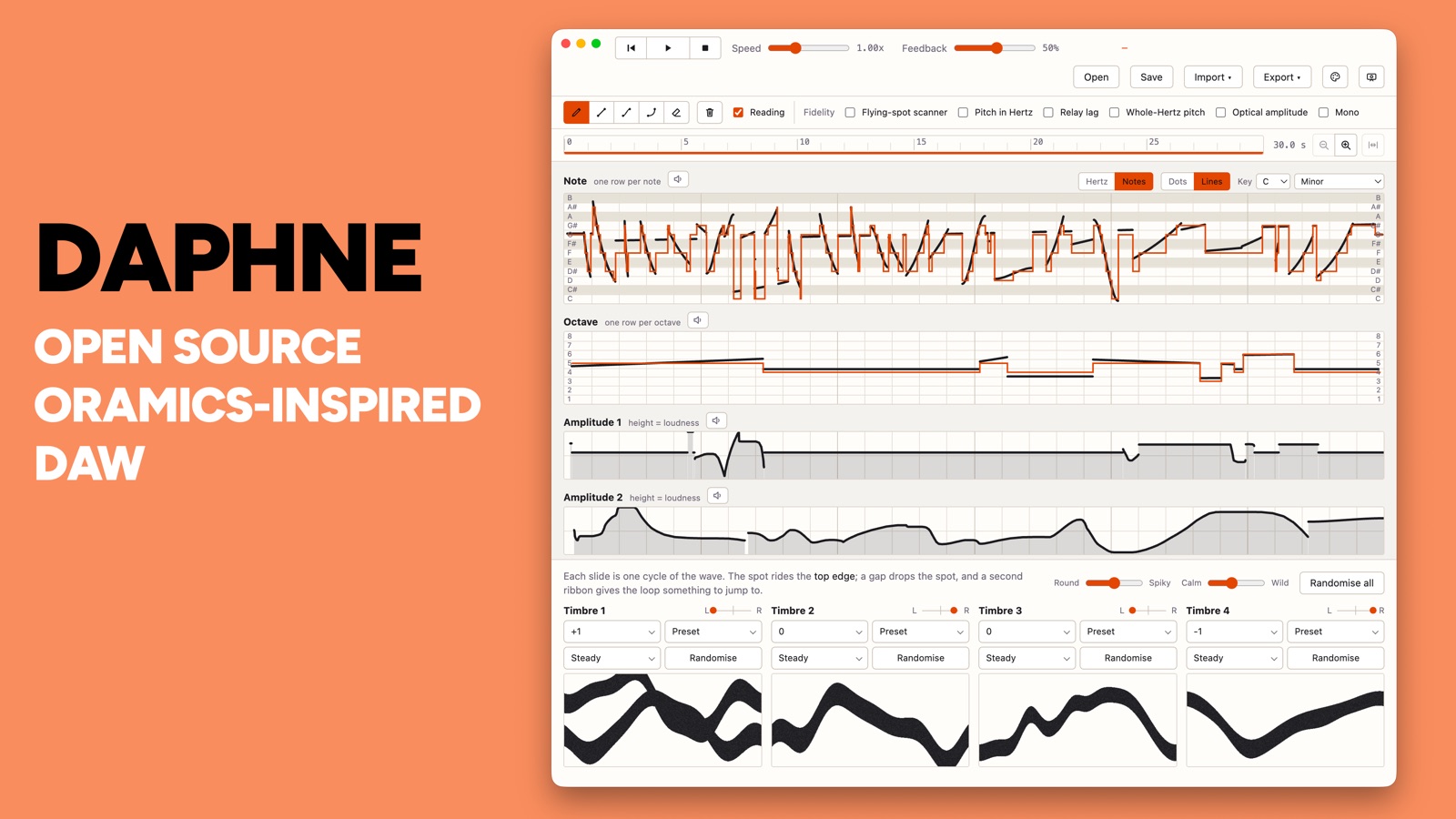
Daphne is a drawn-sound instrument after the Oramics machine, which Daphne Oram built so that she could write sound rather than record it. You draw the sound, on screen or on paper, and the application plays what you drew. It was written to run the Drawing Sound workshop, and it is free and open source under GPL-3.0.
The machine it follows read ten strips of 35mm film: pitch written as marks, with loudness, vibrato and reverberation drawn as lines, and the waveforms painted on glass slides in front of cathode ray tubes. Daphne keeps that arrangement, a lane to each strip and four painted slides beneath them.
Drawing
Draw and erase are freehand. Line, curve and arc are placed instead: press where the mark begins, drag, and release where it ends, and the application fills in what lies between. A line is the shortest way between the two values. A curve eases out of the first and into the second, which is the shape a hand makes when it draws a swell. An arc is the exponential between them, calculated in equal steps of decibels rather than equal steps of height, so it falls steeply at the loud end and flattens towards silence. That is how a sound actually dies away, and it is why an arc drawn between two amplitudes sounds like an even fade although the curve on screen looks lopsided. Holding shift snaps the angle to one of sixteen, measured on screen rather than in the data, because a lane is wide and short and a slope that looks gentle on the page can be a jump of several octaves in the values underneath it. A mark stays dashed while you aim it and is written to the lane only when you let go.
Pitch can be read two ways. The Hertz strip is the machine as it was built and remains the default, but it is hard to draw a tune on, since octaves fall unevenly up a linear scale: middle C and the C above it stand a hand’s width apart at the bottom of the lane and nearly touch at the top. Notes mode splits pitch into a band of twelve note rows above a band of eight octave rows, which follows Oram’s own later design and Tom Richards’ Mini Oramics rather than the 1969 machine. A mark can be a dot, which sets a note that holds until the next one, or a line, which is followed as it moves with enough hysteresis that a hand resting on a row boundary does not flicker between two notes. Choosing a root and a scale snaps marks to the nearest note in it and shades the rows outside, and the reading is drawn back over the marks as a staircase, dashed where the relays hold a note across blank paper. The frequency is still rounded to a whole Hertz, so middle C plays at 262.
The timbre slides are painted with a brush rather than drawn with those tools. Each carries a preset menu for sine, saw, square or blank. A blank slide passes the beam straight through, so the photocell sees steady light and that voice falls silent, which gives you a way to take a timbre out without drawing its amplitude down to nothing. Supersaw paints a saw and adds six detuned copies, twenty-five cents either side, each of them a scanner of its own reading the same slide. The original machine had no equivalent.
Drawing on paper
The sheets exist so that people can draw on them by hand, and in a workshop that matters more than the screen does. Everyone can start at once, with markers, before anyone has opened the application. Exporting a PDF returns the same template with your lines printed onto it, and a blank one can be printed instead:
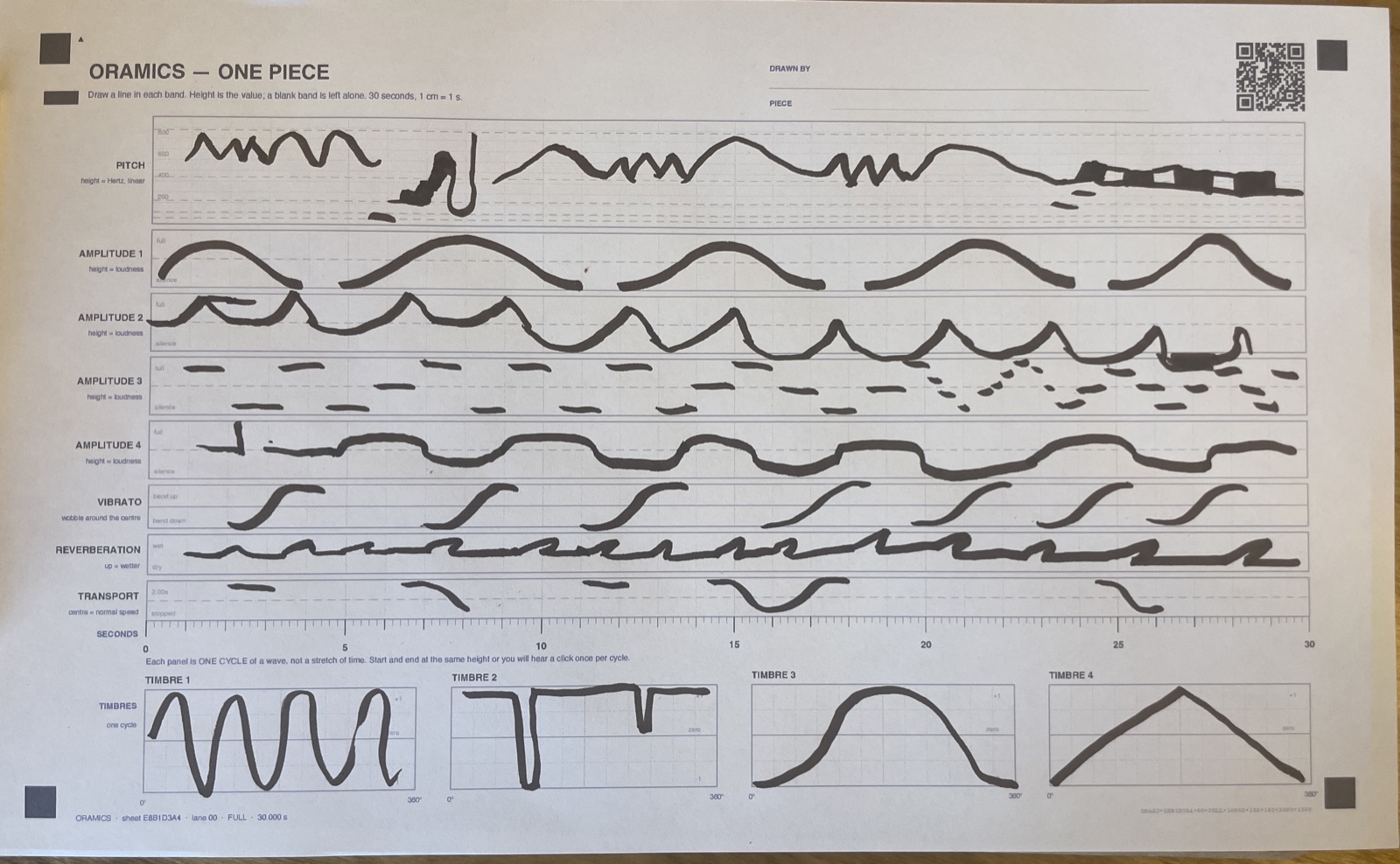
A lane runs across the page for pitch, four more for the amplitudes, then vibrato, reverberation and the transport, with a seconds ruler beneath them and four panels at the foot for the waveforms. A sheet lasts exactly thirty seconds by construction, since the printed time field is 300 mm at 10 mm per second, which makes a centimetre a second and a millimetre a tenth of one. The page carries its own instructions along the top: draw a line in each band, height is the value, and a blank band is left alone.
The timbre panels at the foot work differently from the lanes above them. Each one holds a single cycle of a wave rather than a stretch of time, so it wraps around. A drawing that starts and ends at different heights leaves a step at the join, and a step repeating once per cycle is heard as a click.
Importing a sheet
Import scan takes a photograph or a flatbed scan of a marked-up sheet and turns the marks back into lanes. It runs in three steps, and each of them reports a failure rather than guessing its way past one.
Registration comes first. The four black squares in the corners are found and a homography is solved onto their known page coordinates, which is why the photograph above does not need to be square to the page or evenly lit. Print scale, scan resolution, page skew, the angle the phone was held at and most lens distortion all fall out of that one calculation together; measured against rendered sheets put through a simulated camera, the worst position error anywhere on the page is about a tenth of a millimetre. Three corners are not enough to solve it, so the importer stops there instead of fitting a plausible wrong map.
The QR code in the top corner then tells the application which sheet it is reading, so the speed and the mode come off the paper rather than being set by hand. A Letter sheet prints the same drawing shrunk to about 79 per cent, and since its corner squares come back as a smaller copy of the same rectangle, undoing that is the same arithmetic as undoing the camera angle. A piece printed on Letter and the same piece printed on Legal read back identically.
What comes out of the last step is the mark in each band, and it becomes a lane in the application exactly as though it had been drawn there. The image of the paper is discarded once it has been read.
Export and import together let a piece go round the loop the workshop runs on: drawn in the application, printed, marked up by hand, photographed on a table, and played back.
What it models
Several of the machine’s constraints are reproduced rather than approximated, since they account for much of how it sounded, and each is a switch in the Fidelity bar. The scanner is one of them. Oram’s surviving slides carry thick irregular ribbons of paint, and none of that is a single-valued function of position, so the machine cannot have traced them. A photomultiplier watched for light, and wherever the paint blocked it the loop drove the scanning spot higher until it could see again, which left the spot resting on the top edge of the paint. Daphne runs that loop at audio rate across a two-dimensional opacity field rather than reading a wavetable, and because the sweep rate is the note frequency, the timbre changes as the pitch moves, as it did on the original.
The vibrato and reverberation strips can be pointed at something the machine could not reach. Switched to Delay, the vibrato line becomes an echo time, glided to rather than jumped to, so dragging it bends the pitch of whatever is already echoing. Moving a tape head along its track does the same thing to what is on the tape. The reverberation strip chooses between a steel plate, which is the likeliest thing the send reached in a Workshop of that period, and a smaller damped room with early reflections in front of it.
Output
Space plays and stops the piece. Export renders one pass to a WAV in a worker, running the same engine faster than real time, so there is no need to record the output while it plays or to stop it at the right moment. One pass is however long the speed and the transport strip make it, plus a short tail for the plate and the bulbs to die away. The file is sixteen-bit mono as the machine was, or stereo with Mono switched off, and it is normalised to peak at -1 dB, because the machine leaves headroom for all four timbres at once and a piece using one or two would otherwise arrive barely audible.
A MIDI export comes from the same render. The machine is sampled every ten milliseconds for the pitch the sheet asks for, the pitch that actually sounds and the level; a note begins when the level comes up and another when the pitch moves more than about half a semitone. What sounded between the notes is written in as pitch bend and the level as expression, because the machine’s loudness is a continuous contour that does not resolve into note velocities.
A projector window opens full screen on a second display and shows every lane with the read heads moving across it. It mirrors the main window and holds no state of its own. The session is saved as you work and restored when you next open the application.
Getting it
Daphne is free, and every version of it always will be. There are builds for macOS, Windows and Linux. The macOS build is signed and notarised and opens normally; the Windows build is unsigned, so SmartScreen objects the first time and you have to choose More info and then Run anyway. The current release is 0.4.0 and the source is at stuart78/daphne under GPL-3.0.
Daphne is an independent reconstruction, built from published accounts of the machine, chiefly Graham Wrench’s. It is not affiliated with the Daphne Oram Trust, Goldsmiths, or the Science Museum, and every departure from what those accounts describe is marked in the code and switchable in the application.