
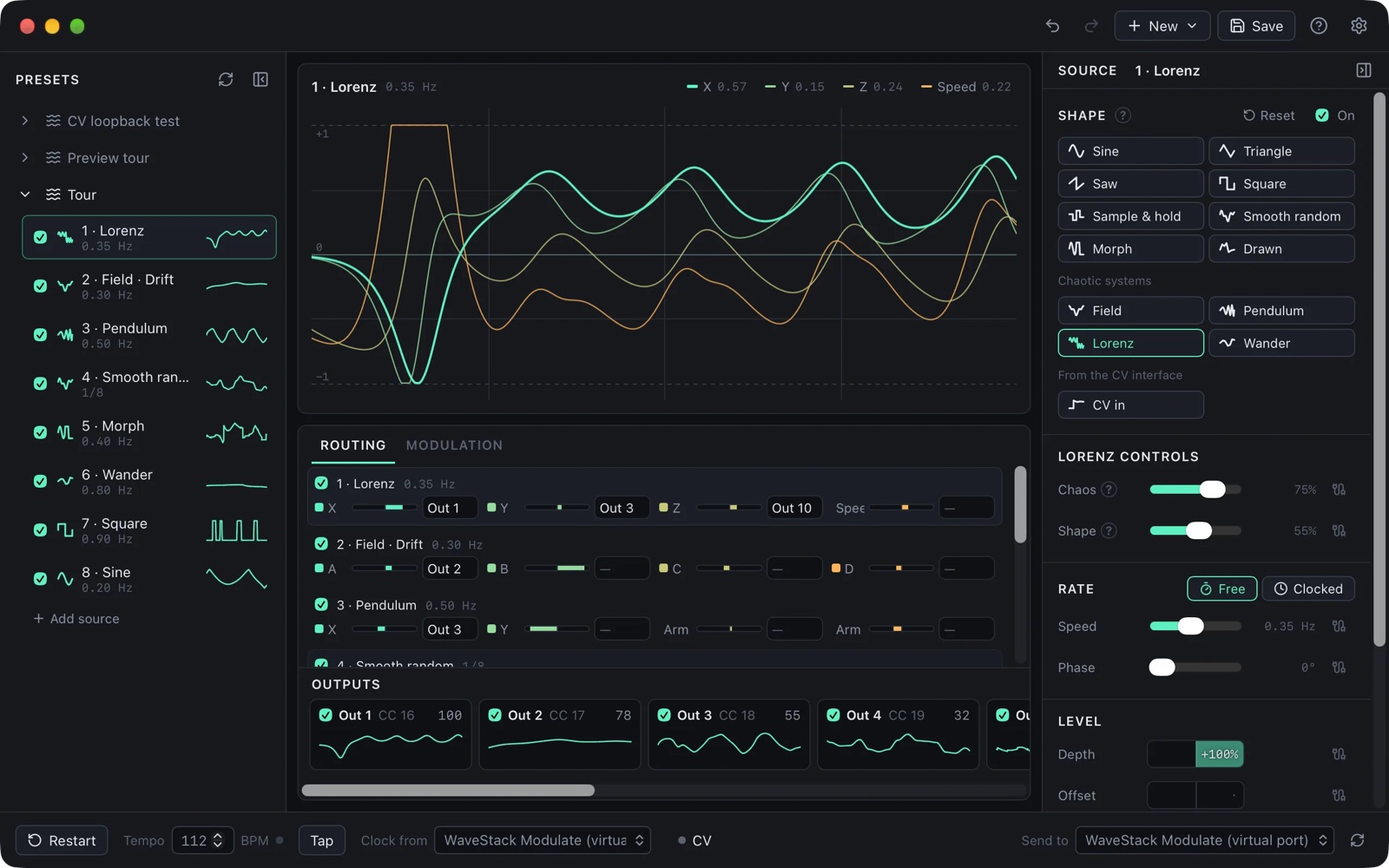
WaveStack Modulate makes LFOs, random changes and chaotic motion, and sends them to synths as MIDI CC. With a DC-coupled audio interface, which can output steady voltages as well as audio, it also sends CV, gates and clocks to a modular synthesiser. The iPad version came out on the App Store on November 4, 2026. The Mac and Windows versions are a preview, released on October 25, 2026, and they are free with every feature switched on while they are being tested.
It is a separate download from WaveStack. WaveStack’s modulation section moves settings inside WaveStack’s own sound, and Modulate sends its signals out to other synths, plugins and hardware. If LFOs are new to you, the LFO chapter of the synthesis guide covers rate, depth and the common destinations.
Sources
A patch can have up to 16 sources. The waves are sine, triangle, saw, square, sample and hold, smooth random, Morph, which blends through the standard shapes, and Drawn, which plays a shape you draw. The chaotic systems are Lorenz, a double pendulum called Pendulum, four random walks called Wander, and Field, a moving pattern read at four points. A source can also be a voltage from an input on your audio interface.
Each source has four outputs of its own, called taps. For most shapes the taps are copies of the same shape shifted in time, and Spread sets how far apart they are, up to a quarter cycle. For Lorenz and Pendulum, each tap follows a different part of the system, so one source can move four settings in related but different ways.
A source runs at a speed from 0.01 to 40 Hz, or at a note length from 8 bars to 1/32 that stays in time with the tempo. Resolution turns the movement into steps, from 256 down to 4. Smooth rounds off sharp corners and jumps, and Rough adds a slow random drift to the level and speed.
Routing and outputs
The Routing tab lists every source with a meter and a menu for each tap, and a tap can go to several outputs at once. A patch can have up to 64 outputs, and taps sent to the same output are added together. An output can also send a clock, a run signal that stays high while the clock is running, or a reset pulse instead of the taps.
Each output goes to a MIDI CC, a CV jack or a gate jack. MIDI goes to Modulate’s own virtual port, called “WaveStack Modulate”, or to a MIDI interface, and 14-bit output is available on CCs 0 to 31 for synths that support it. Windows has no virtual MIDI ports, so there you need a MIDI interface or a loopback driver such as loopMIDI.
Modulation between sources
A source can change the speed, depth, offset, phase, shape, spread, smoothing or roughness of another source, or of itself, so one LFO can speed up another. These connections can be set from a source’s editor, from a list of routes in the Modulation tab, or from a grid with a row for each source and a column for each control. The synthesis guide explains the idea in modulating modulation and the modulation matrix.
Tempo and clock
Tempo can be typed in from 20 to 300 BPM or tapped. Modulate can also follow MIDI clock, including its start, stop and position, and it can follow clock pulses on an interface input at 1, 2, 4, 24 or 48 pulses per quarter note, with an optional reset input. Restart sends every source back to the beginning of its cycle at the same moment.
CV and gates
CV and gates work with the Expert Sleepers ES-9 (8 outputs, 14 inputs), ES-8 (8 outputs and 4 inputs, plus 8 of each over ADAT) and NTX-8CV (8 outputs, no inputs), and with other DC-coupled interfaces. On an ES-8 or ES-9, an ES-5 adds 8 gates, and its expansion headers can take ESX-8GT and ESX-8CV expanders for up to 40 more jacks.
A CV output has a voltage range such as ±5 V or 0 to 10 V, and it can be quantized to a scale and root note at 1 volt per octave. A gate output is high whenever its value is over the output’s threshold. Reading CV or a clock from an interface input requires microphone permission on a Mac or iPad, and on an ES-9 you need to turn off DC blocking for that input.
Plugins
On the Mac the plugin comes as CLAP, VST3 and Audio Unit, and on Windows as CLAP and VST3. It is a separate download and works as a MIDI effect: you put it before an instrument or on a MIDI track, clocked sources follow the DAW’s tempo, and the patch saves with the project. The iPad version includes an AUv3 for hosts such as AUM, Loopy Pro and Logic Pro. GarageBand cannot host MIDI processors. The plugins only send MIDI, so to send CV while using a DAW you run the app at the same time.
Free and Pro
The free version has one source, two MIDI outputs and the sine, triangle, saw, square, sample and hold and smooth random shapes. Pro adds 16 sources and 64 outputs, Morph, drawn shapes, the chaotic systems, Smooth and Rough, modulation between sources, CV, gates, CV in, clock in and the plugins. On the iPad, the app is a free download and Pro is a one-time purchase in Settings. Pro cannot be bought on Mac or Windows yet, and during the preview those versions include all of it.
Where it is
Modulate runs on macOS 12 or later on Apple Silicon or Intel, and on 64-bit Windows 10 or 11. The Windows app and plugin are not signed yet, so Windows may warn you: click More info, then Run anyway. The iPad version requires iPadOS 16 or later and is on the App Store.
The preview has not been tested with every piece of hardware it supports. The ESX-8CV’s voltage scale, the order of the ES-5 and ESX-8GT gates, and CV on the iPad are all untested on real hardware, so check them on your own system before relying on them.
The app sends anonymous counts of which features are used, along with its version and platform, and you can turn this off under Settings, then Privacy. The plugins send nothing. I would like to hear about anything that does not work, at [email protected].
Download
- Download WaveStack Modulate for Mac and Windows
- WaveStack Modulate for iPad on the App Store
- Getting started with Modulate
- Modulate help
In the synthesis guide
- What Is an LFO? Low-Frequency Oscillators
An LFO is an oscillator that runs below the audio range and moves a setting up and down. Sent to pitch, cutoff or level, it produces vibrato, a repeating filter sweep or tremolo.
- The Modulation Matrix: Sources and Destinations
A modulation matrix connects any modulation source to any destination by an amount. It does the job of patch cables on a synthesiser with fixed connections.
- Modulating Modulation: LFO Depth, Rate, Shape
The amount, rate or shape of one modulation can itself be modulated by another source, so that vibrato fades in or an LFO speeds up over a note.